
BRAINPOP
O to 1 design of an internal CMS tool for instructional designers
Role
Lead Product Designer
Team
1 lead product designer · 1 PM
· 3 QA engineers ·
5 instructional designers ·
+4 software engineers
Platform
Web
I led the design for an internal authoring tool that streamlined the configuring and content management process for our instructional designers for "pause points" activities, replacing their process using google docs and web engine, which was slow and inefficient.
Business impact
2x
output of delivered learning activities per sprint
10/10
team satisfaction and ease of use
PROBLEM SPACE
The old publishing platform was slow, error-prone, and built on disconnected tools
SLOW AND INEFFICIENT
Instructional designers drafted in Google Docs before migrating to Web Engine.
WORKFLOW DELAYS
Formatting errors occurred every time content moved between platforms, causing rework.
SOLUTION
A streamlined authoring tool in one CMS, replacing the two-step process entirely.
Context
What are Pause Points?
Pause points are a contextualized quiz embedded within a movie, promoting active viewing and helping scaffold movies for different grade levels.
Who this was built for?
Built for the instructional design team, to curate and upload content for the pause points movie feature.
Users: Learning designers authoring pause point content
Goal: Replace Google Docs + Web Engine with one integrated CMS
Scope: 0 to 1, no existing tool to build from
research
Qualitative Interviews
Quotes from interviews with the learning design team that surfaced key workflow insights.
Inconsistent Formatting Issues
"Every time we move content from Google Docs to Web Engine, we face formatting issues. It's time-consuming to fix and error-prone. I'd love a tool that lets us format everything in one place without these hurdles."
Frustration with Time-Consuming Process
“The current system is just too slow. We’re spending more time uploading content to Google Docs and then migrating it to Web Engine than actually creating the pause point content. It’s frustrating to be caught up in such an inefficient process.”
Lack of Flexibility in Question Types
"There’s no easy way to include multiple choice, open-ended, and non-response questions efficiently in the current setup. We need something that allows us to create different question types without jumping through hoops.”
Need for Streamlined Grade Band Inputs
"Entering grade bands manually every time slows us down. It would be great to have a dropdown or tagging system that lets us select grade levels more quickly, without worrying about errors."
Strategy
Jobs To Be Done
After sitting down with learning designers and noting their challenges, my PM and I outlined a "Jobs To Be Done" exercise.
1
Streamline content creation
When publishing pause points, I want a single platform to create and publish content without needing multiple tools, so I can work faster and focus on producing quality content.
2
Reduce formatting and migration errors
When transferring content to the platform, I want a way to manage formatting so I don't waste time fixing errors that occur in our old setup.
3
Easily organize and tag pause point sets
When authoring pause point sets for different topics, I want an intuitive way to organize and tag them by product, topic, and grade band.
4
Create multiple question types efficiently
When authoring pause point questions, I want a tool that allows me to easily create multiple-choice, open-ended, and non-response question types.
5
Quickly input grade bands and tags
When assigning grade bands, I want a simple dropdown or tagging system that lets me select predefined grade ranges to avoid manual input and ensure accuracy.
6
Reduce risk of accidental publishing
When finalizing content, I want to preview and have a clear confirmation step before publishing goes live, so I can double-check my work.
Final designs
Design Solution
1
2
3
4
5
6

Search & Select
A search bar lets learning designers quickly find a topic and its related movie to begin authoring content.


Movie player with scrub bar
Once a topic is selected, the movie player renders with a scrub bar that allows learning designers to copy a timestamp to their clipboard to add a "pause point" in the movie.
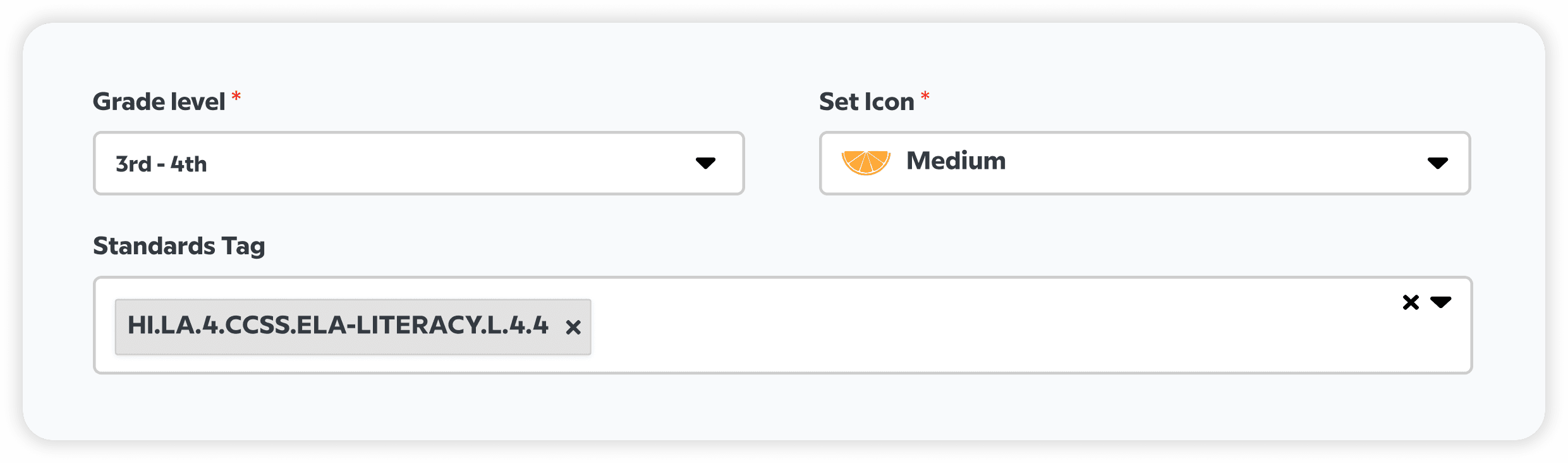
Categorization of questions
Learning designers can easily categorize questions by grade level and educational standards via built-in dropdowns.
This simplifies the organizational process and ensures accurate tagging and categorization for each pause point set.


Timestamps across all questions show up in the movie player as they are inputted.
Preview before publishing
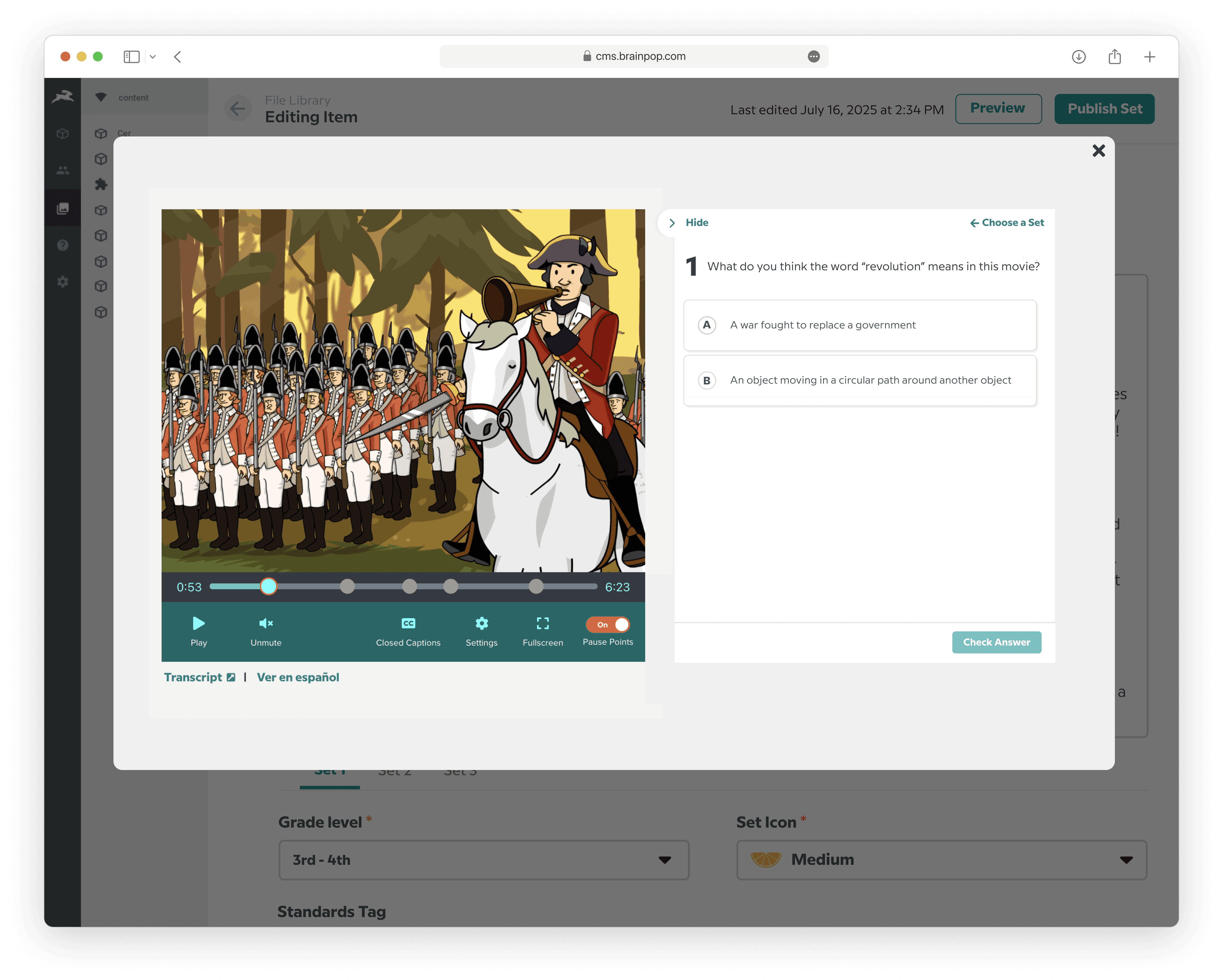
A modal loads the content exactly as it will appear in production, so designers can confirm everything before it ships.
Publish safeguard
Publishing surfaces a confirmation modal, a simple safeguard against shipping changes by accident.

outcomes
Impact
2x
Learning activities published per sprint
The streamlined workflow doubled the team's output of pause point topics tracked per sprint.
10/10